
Every table, live.
Every bill, right.
IntelixServe is a restaurant POS built around occupied tables — not tickets. Waiters order from phones, the counter sees the whole floor, and bills print with the correct GST or VAT block, even when the internet drops.
- No card needed
- Cloud-hosted, work from anywhere
- QR table ordering
- Swiggy & Zomato orders
Food
GST bill · CGST + SGST
Beverage
GST bill · service charge applies
Liquor
VAT bill · TIN · Indian vs imported
Built for the way an Indian restaurant actually runs
From the first order to the closing report — one system for the counter, the waiters and the owner.
Live floor on every screen
Running, bill-requested and billed tables update instantly on the counter and every phone over SignalR — with 30-second polling as the safety net.
GST and VAT series
Food & Beverage bills carry GSTIN with CGST/SGST; liquor bills carry TIN with VAT. Discounts are separate per type; service charge applies to F&B only.
Guests order by scanning the table QR
Each table gets a QR code. Guests scan it, browse the menu on their own phone and place the order — it goes straight onto that table's running order for the kitchen and the counter.
Swiggy, Zomato & more
Online orders from Swiggy, Zomato, Magicpin and ONDC land on the floor as their own channel with a kitchen ticket; menu, prices and availability stay in sync from one place.
Billing through the mobile app
Waiters issue the bill, take cash, card or UPI, and print the receipt over Bluetooth — all from the phone at the table, without walking to the counter.
ESC/POS from phones
The waiter app prints directly to Bluetooth Classic or LAN (port 9100) printers — so bills go out even when the restaurant internet is down.
Daily report
Cash vs credit, food / beverage / liquor sale, discounts and service charge — the sheet you close the day with.
Work from anywhere
The counter and the admin are web apps; the owner can watch the floor, issue bills and read the day's reports from home, another branch or a phone — same live data, no VPN.
All data saved on the cloud
Every order, bill and payment is stored in the cloud and backed up — nothing lives on a counter PC that can crash, and every device sees the same numbers.
Bills go out even when the Wi-Fi doesn't
The waiter app prints ESC/POS receipts straight to Bluetooth or LAN printers. The counter is an installable PWA. Orders sync the moment the connection returns — nobody waits for the bill.
- 80 mm and 58 mm thermal receipts
- Bluetooth Classic or LAN (port 9100) printers
- Auto-print the moment a bill is issued
- Silent kiosk printing at the counter
What a waiter sees, screen by screen
Real screens from the Android app — the same floor, menu and orders as the counter, on a phone in an apron pocket.
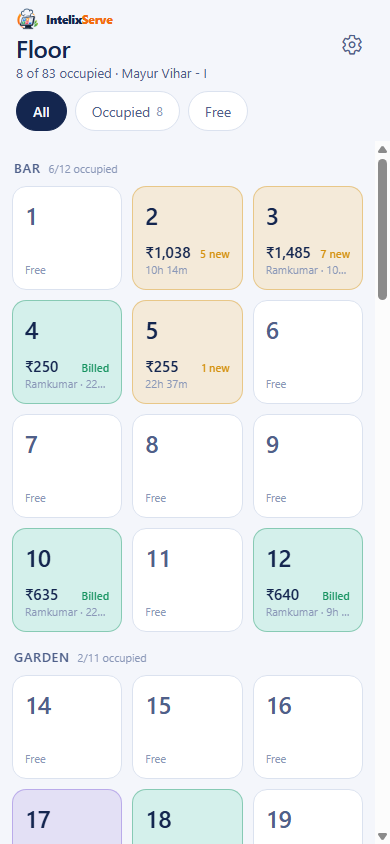
Live floor
Every table by section — occupied, billed, free — with the running amount and who is serving it.
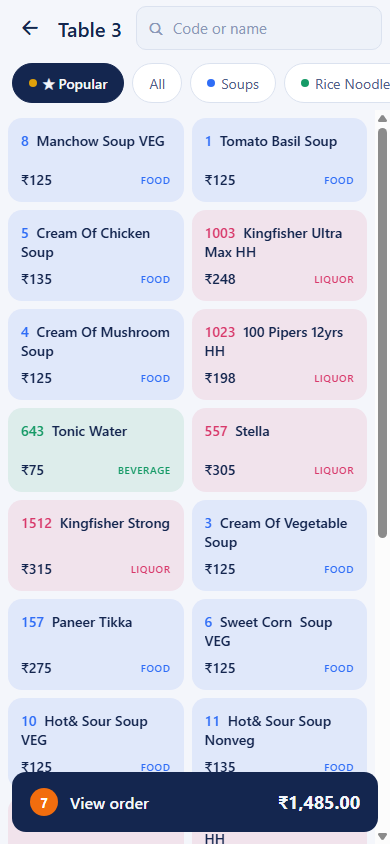
Menu at the table
Popular first, then categories; type a dish code or search. Food, beverage and liquor colour-coded.
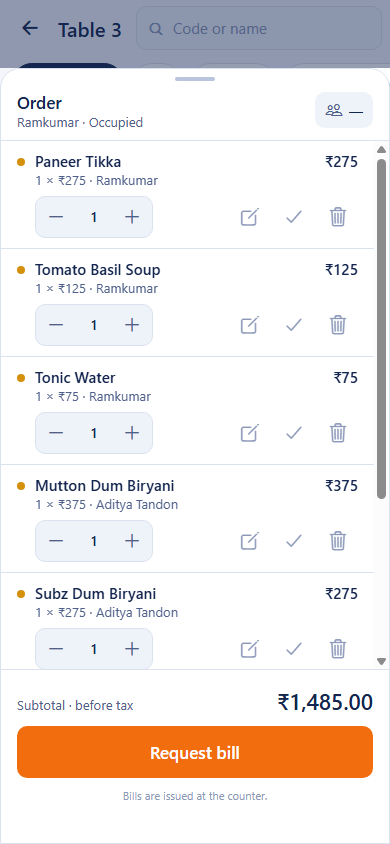
The order sheet
Quantities, notes and voids per line; subtotal live; one tap to request the bill.
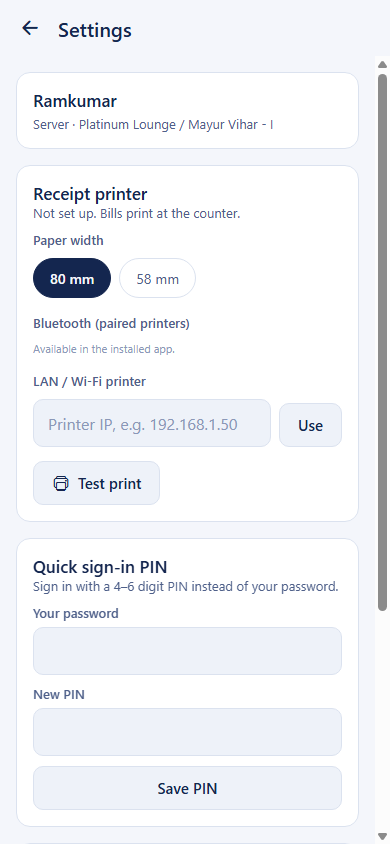
Printer & PIN
Pair a Bluetooth or LAN receipt printer, pick 80 / 58 mm, test print — and set a quick sign-in PIN.
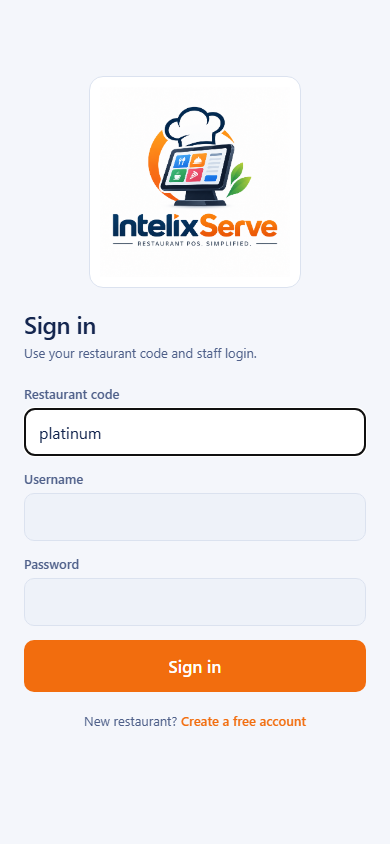
Sign in
Restaurant code and staff login, then a PIN or fingerprint between tables.
Live in three steps
Start on the free Starter plan today — full product, one branch, 3 staff logins, 15 tables. Upgrade when you outgrow it.
- 01
Create your restaurant
Two minutes on this site: name, restaurant code, first branch, owner login. Your workspace is ready on Trial.
- 02
Load the menu, add staff
Categories, dishes, codes and prices — typed in or migrated from your old system. Give each person a login and a role.
- 03
Run the floor
Waiters take orders on phones, the counter sees every table live, bills print with the right tax block. Reports close the day.
Simple monthly plans
Start free on Starter; Standard and Pro add branches, staff and unlimited volume. Every plan includes onboarding.
Starter
Free. A small outlet with a counter and a couple of phones.
Free
no card, no time limit
- 1 branch
- Up to 3 staff logins
- Up to 2 devices
- Up to 15 tables, 60 dishes
- Up to 300 bills a month
Standard
Busy outlets with a full team — unlimited tables, dishes and bills.
₹2,499/ month
per restaurant · billed monthly · GST extra
- 3 branches
- Up to 30 staff logins
- Up to 15 devices
- Unlimited tables and dishes
- Unlimited bills
Pro
Growing brands with many outlets and priority support.
₹5,999/ month
per restaurant · billed monthly · GST extra
- 10 branches
- Up to 100 staff logins
- Up to 50 devices
- Unlimited tables and dishes
- Unlimited bills
Every plan includes
- Counter web app (works offline as a PWA)
- Waiter app for Android phones & tablets
- Live floor across every device
- GST + VAT bills, thermal receipts
- Sales, daily and department reports
- Menu, staff, tables and settings admin
- Bluetooth / LAN receipt printing
- Platform support sign-in for help
- Cloud hosting with backups — work from anywhere
- QR-code table ordering for guests
- Swiggy, Zomato, Magicpin & ONDC orders
Need more than three branches, or a custom integration? Talk to us.
Where it's going
What ships next is decided with the restaurants already using it.
Counter + phones + reports
Everything on this page, in production today.
QR table ordering
Guests scan the table QR, order from their own phone onto the table's live order and ask for the bill; the counter gets a chime.
Planned — not yet available.
Swiggy, Zomato & more via UrbanPiper
Online orders land on the floor with a kitchen ticket; menu, prices and stock-outs sync from one place; payout reconciliation.
Planned — not yet available.
Kitchen display & shift KOT
Kitchen screens by prep station, move lines between tables, material-consumption reports.
Planned — not yet available.
Questions owners ask us
Do I need special hardware?
No. The counter runs in any modern browser on a PC or tablet; waiters use Android phones. Any ESC/POS thermal printer (Bluetooth or LAN) works.
Does it work when the internet drops?
The counter app is a PWA and phones print directly to the printer over Bluetooth or LAN, so bills still go out. Orders sync when the connection returns.
Can we keep our existing bill numbers?
Yes. Set the prefix, padding and next number per series, or use one shared running number that continues from where your old system stopped.
We serve liquor — how are bills handled?
Liquor lines go on a VAT bill with your TIN, food and beverages on a GST bill with your GSTIN. Or combine them into a single invoice with both tax blocks.
Is it really free?
Yes. Starter is free for as long as you like: one branch, 3 staff logins, 15 tables, 60 dishes and 300 bills a month, with the full product — counter app, waiter app, GST/VAT bills, printing and reports. No card needed. When you outgrow it, ask for Standard or Pro from Admin → Restaurant inside the app and we switch you over.
Is our data separate from other restaurants?
Completely. Every record is tagged with your tenant and SQL Server row-level security enforces it on every query — not just the app.
Can guests order without a waiter?
Yes. Print the QR code for each table from Admin → Tables; guests scan it, see your menu on their phone and place the order, which appears on that table's running order for the kitchen and the counter. Payment is still taken at the table or the counter.
Do Swiggy and Zomato orders come into the same system?
Yes. Online orders arrive as their own channel with a kitchen ticket, and the menu, prices and stock-outs you set in IntelixServe are pushed to the aggregators, so you stop maintaining three menus.
Can you migrate our menu?
Yes. We have migrated full menus and item codes from legacy MS Access and Excel systems; share your export during onboarding.
Your floor could be live by tonight's service.
Create your restaurant, add your menu, hand phones to the waiters. We help with menu migration and printer setup on every plan.